Collaboration space - user guide
Logitech control
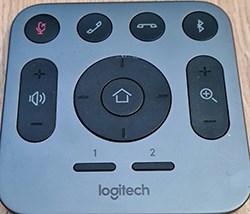 When you have joined a meeting or used meet now you can use the Logitech control to zoom and focus the camera as required.
The top row of buttons are not currently used in the collaboration space.
- Volume up and down on the left - controls the volume
- Home button in the centre of the navigation control - centres the camera
- Navigation controls around the home button - allow you to move the camera right, left, up and down
- Zoom option on the right - allows zooming in and out
- Number 1 - focuses on the meeting organiser
Please be mindful of data protection principles when using these features, always be aware of what can be seen and heard during your meetings.
Page 3 of 3